Add or replace furniture in listing photos of empty or lightly furnished rooms, compare every result with the original, and export only the images that are accurate enough to publish.
Upload listing photos, create a proof, then review the original and staged pair before export.
Add listing photos for a staging proof
Choose photos first. New accounts get 5 free credits. No card required.
Click, press Enter, or drop files here to open the photo picker
Before
After · Modern
Drag to compare
Sample pair: drag the handle to compare an original room photo with an AI-staged result. Every result still needs review against the original before it enters a listing.
1-6
listing photos in a small proof set
1/3/5
credits per photo by quality
2
files to compare: original and staged
Review
before an image enters a listing workflow
Who VirtualStagingAI is for
For listing agents
Turn room photos into staged proof images that sellers and teams can review before publication.
For photographers
Keep original and staged pairs together so clients can approve the right images without file confusion.
For small property teams
Estimate credits for the whole property, approve usable images, and keep disclosure checks in one workflow.
What Is Virtual Staging?
Virtual staging adds digital furniture and decor to a photo of a real room. It can make an empty space easier to understand, while the original photo remains the source of truth.
How the AI creates a staged room
The model reads the room's perspective and lighting, then generates a furniture arrangement in the style you choose. A good proof shows a believable use of the same floor area.
Start with one photo. If the layout and scale look right, apply the same direction to the rest of the listing set.
Digital vs physical staging
Cost
Physical staging involves furniture, delivery, setup, and pickup. Digital staging uses credits per image and leaves the property unchanged.
Speed
A generated proof avoids scheduling and another property visit. The source photo and final review still determine whether it is usable.
Flexibility
You can compare styles from the same original photo. Each version still needs to preserve fixed features and honest room proportions.
Virtual Staging by Room Type
Start with the rooms buyers find hardest to read when empty. Each type needs a different approach to furniture scale and fixed features.
Six photos at Standard quality use 18 credits. Allow extra credits for proofs or retries, and check the current plans before buying.
Before and After Virtual Staging Examples
See original and staged pairs — including results that changed fixed features and would fail review — then use the same checklist on your own listing photos before publishing.
Review the examples
What to check in each before-and-after pair
These examples show possible staging directions. Results vary by source photo, so use the notes below to judge accuracy before publishing.
Real Estate Agent
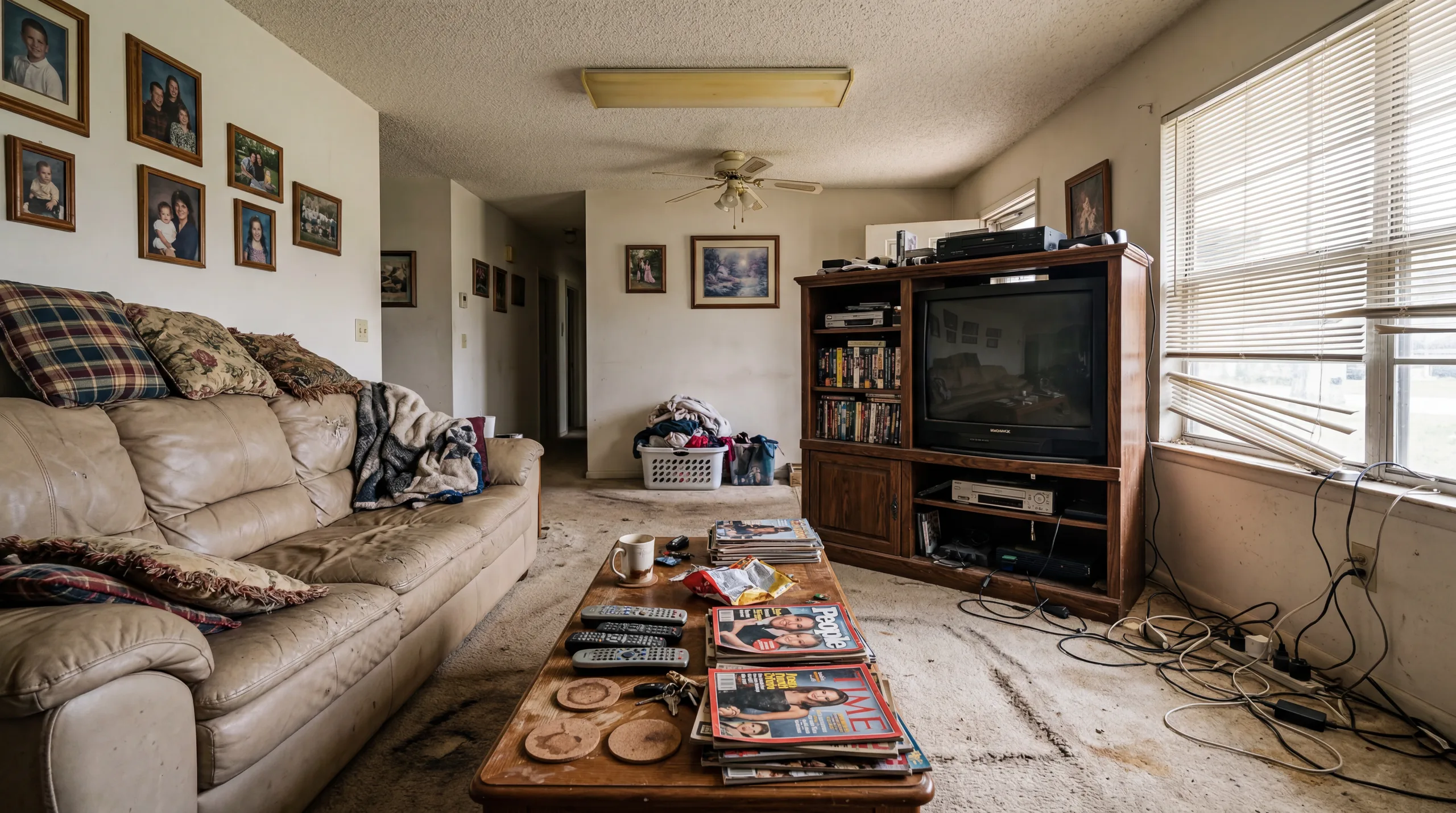
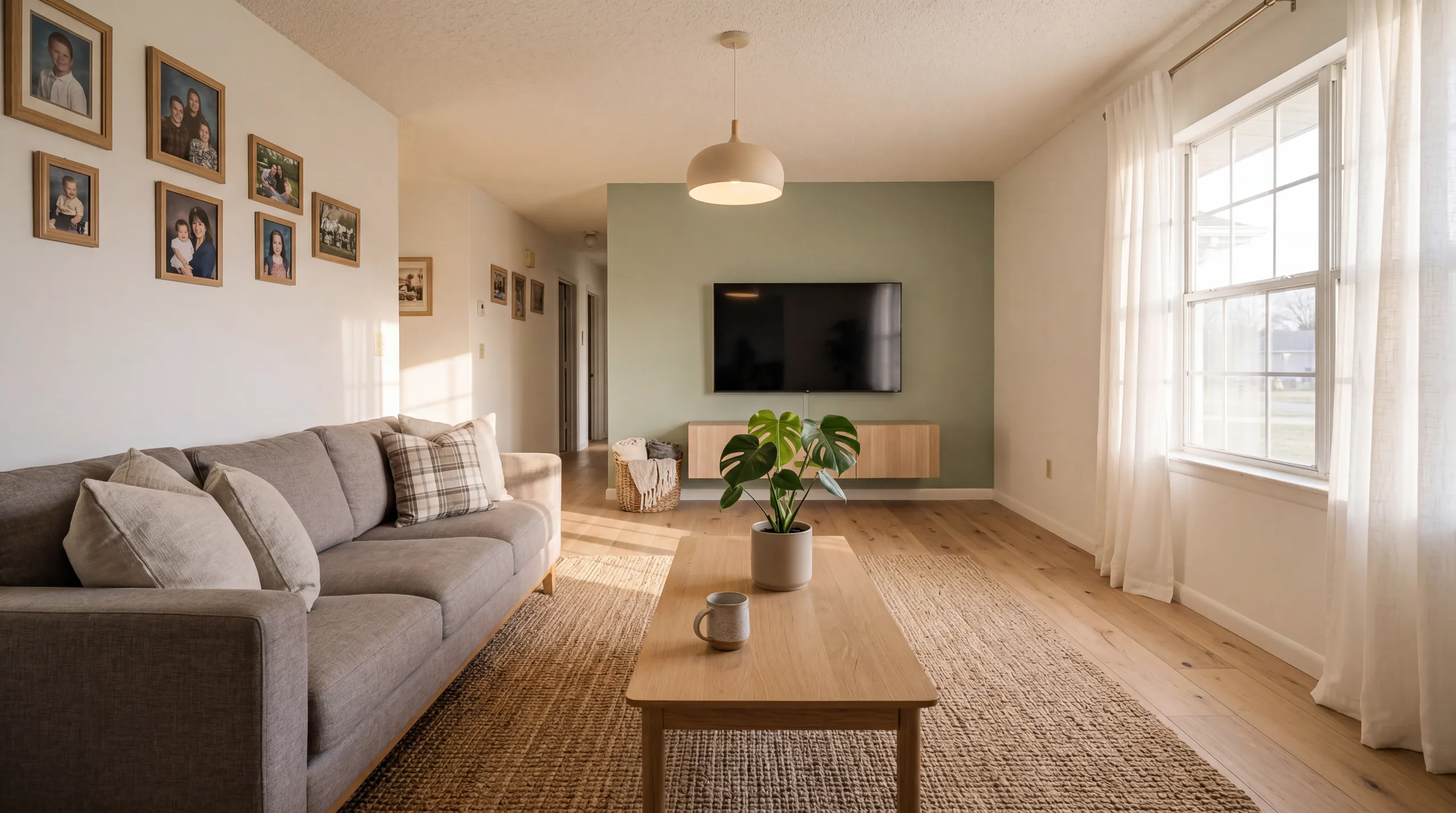
A lived-in living room, restaged — check the floor and wall too
Before
After
Review note
"The original is furnished. Besides new furniture, this result changed the carpet to wood flooring, the wall colour and the light fixture — fixed-feature changes that must be rejected or regenerated, never published; disclosure only covers generated furniture or decor. Check that every door, window, and built-in still matches the original."
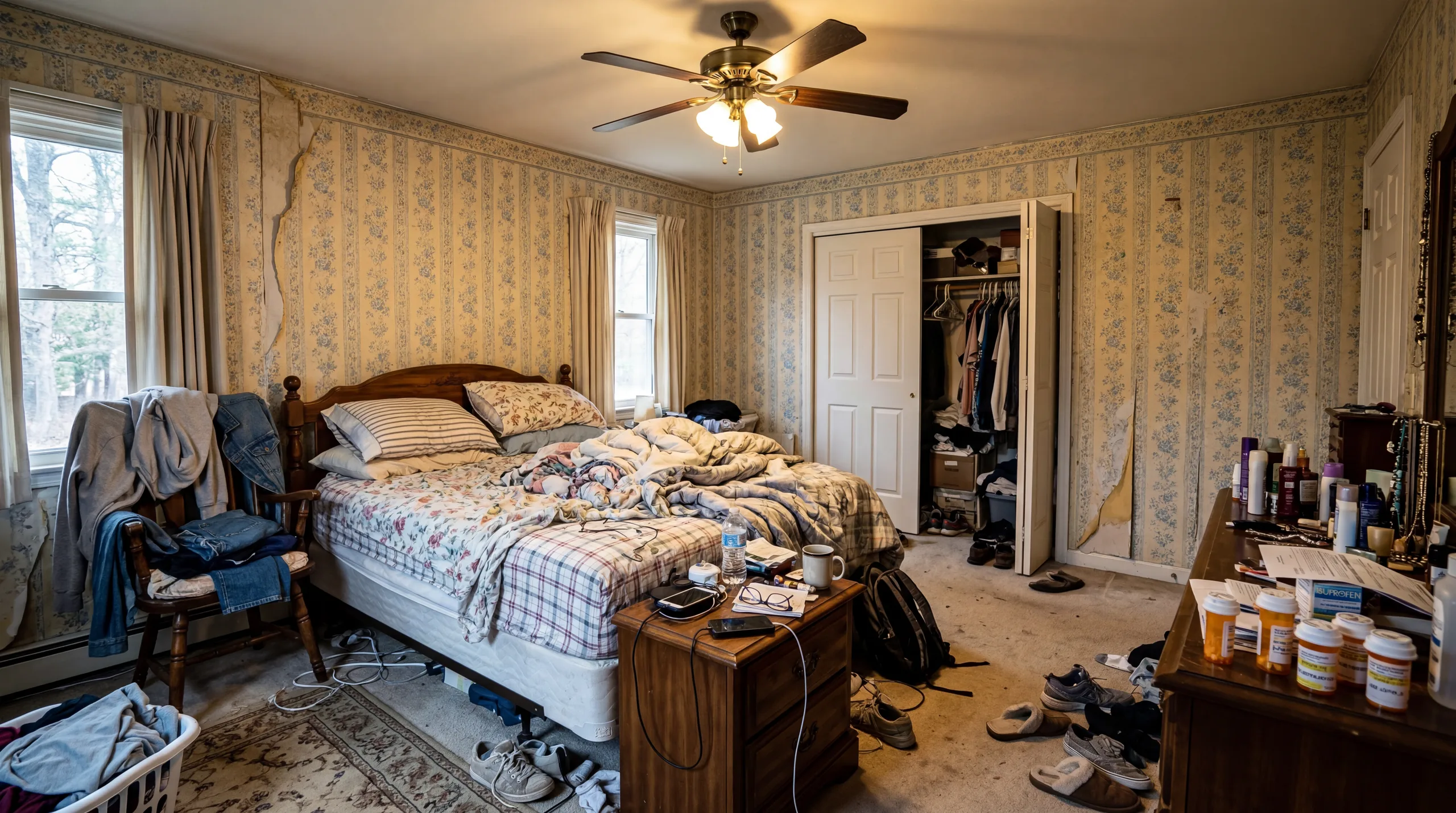
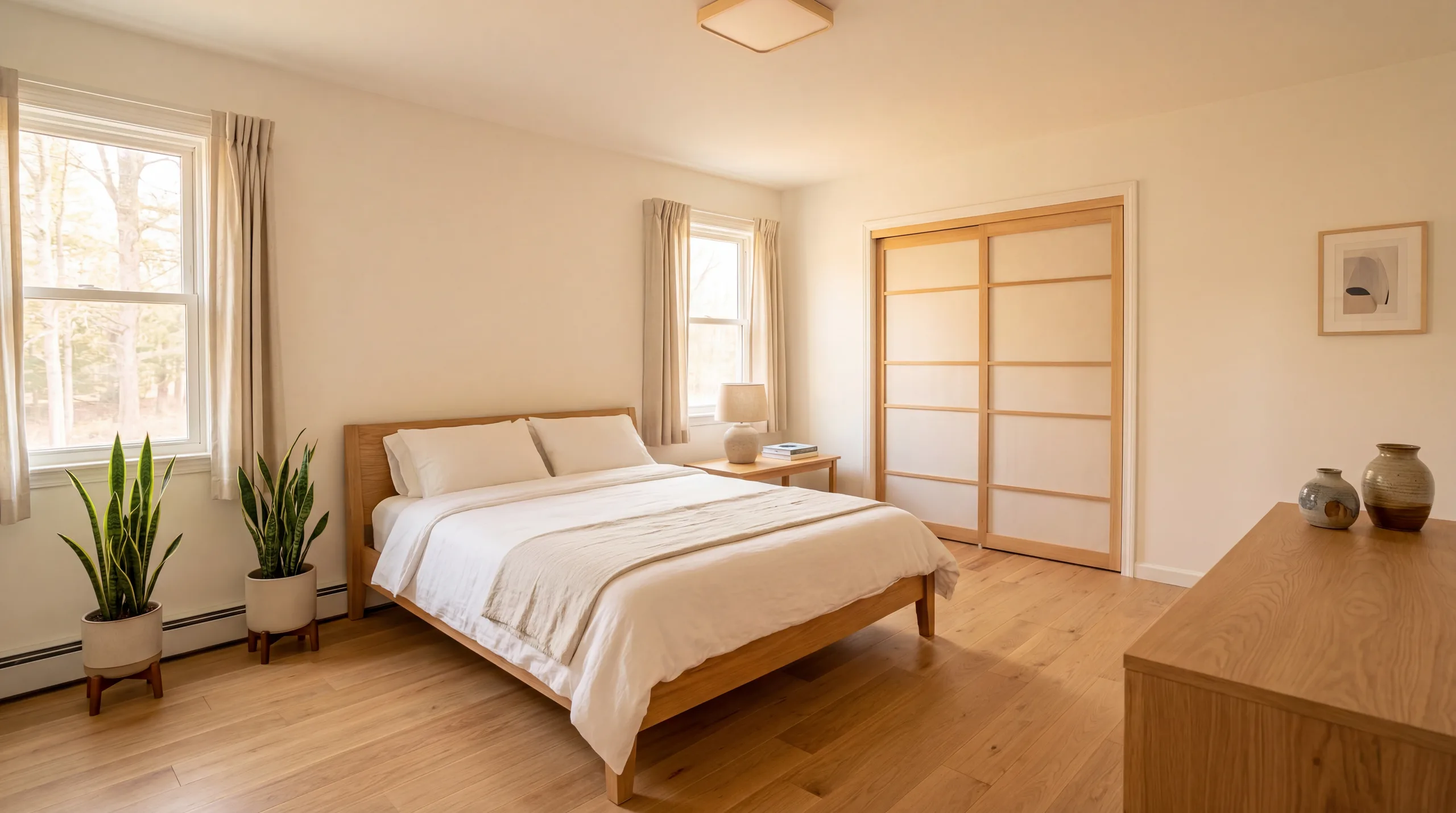
Rental planning
Show how a bed fits — and spot the finish changes
Before
After
Review note
"Look at bed width, nightstand spacing, window access, and visible floor. This result also removed the wallpaper and changed the floor and closet doors — fixed features that fail review. For rentals, use current photos of the actual furnished room when required."
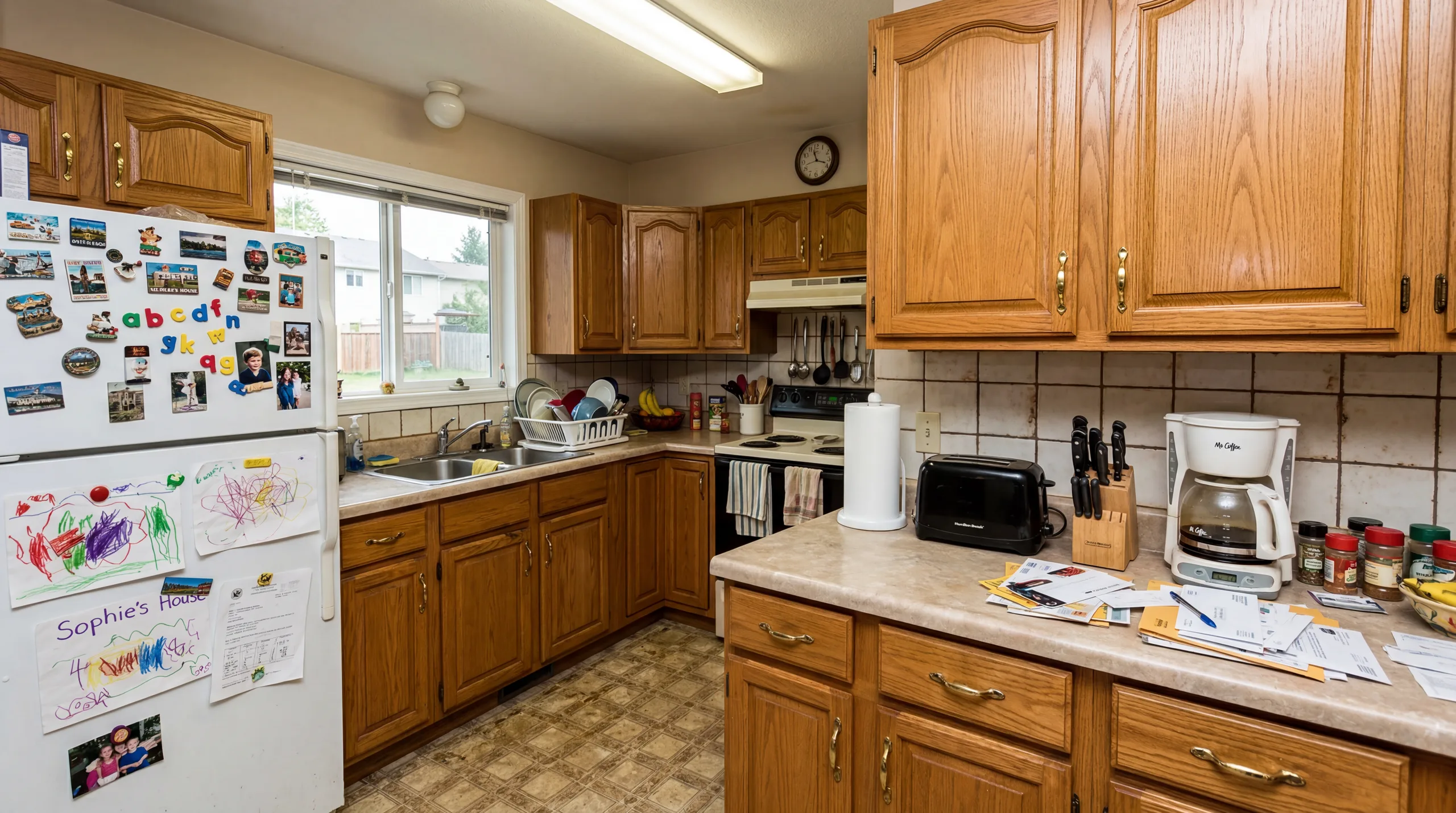
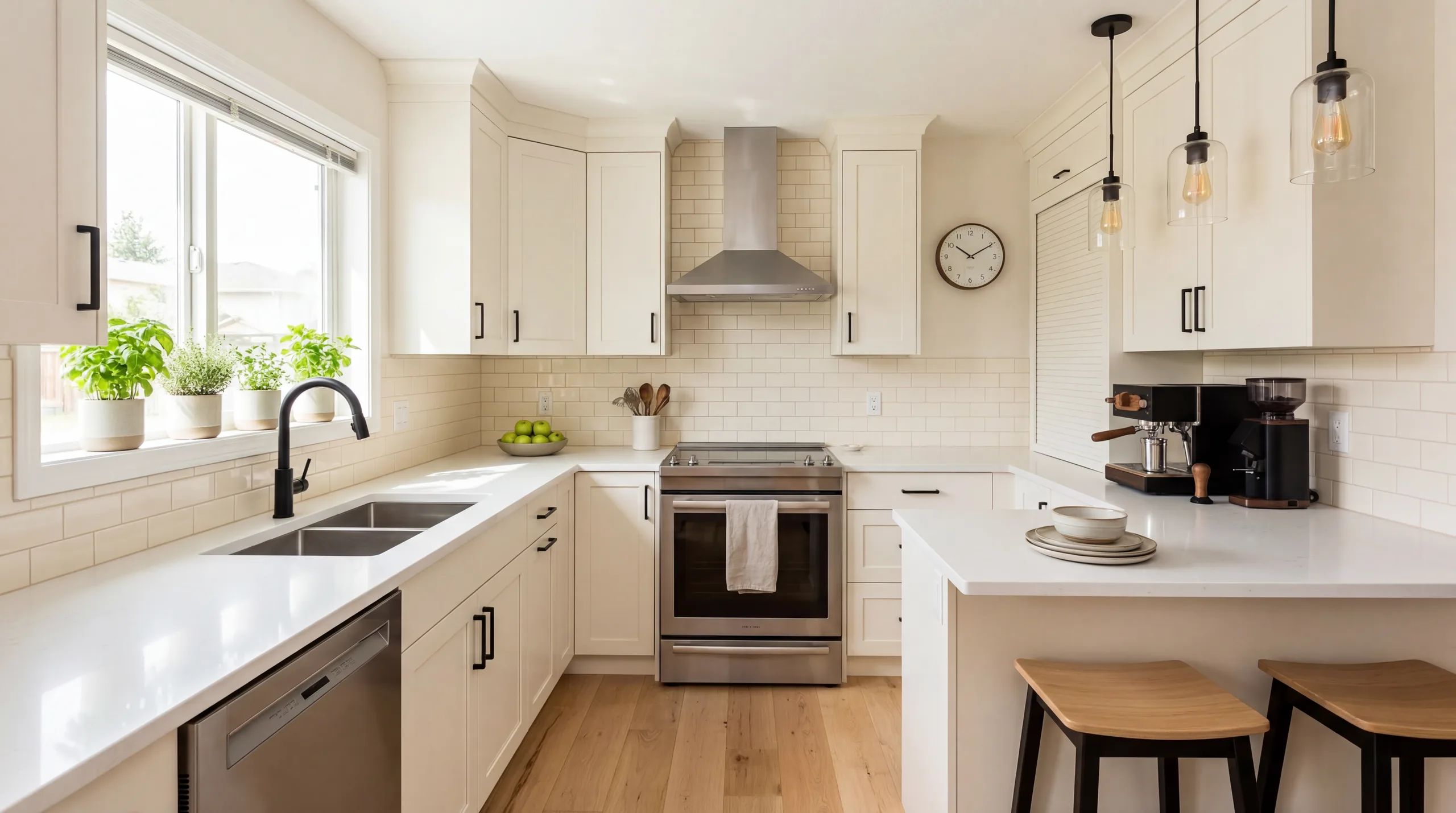
Property Developer
What a kitchen result must not do: change the finishes
Before
After
Review note
"Cabinets, counters, appliances, and fixtures must stay true to the source photo. This example replaced all of them — a fail. Keep it as a reminder of what to reject, and clearly label generated furniture or decor when required."
Clear answers on cost, photo quality, room types, and publishing rules.
What is virtual staging?
It adds digital furniture and decor to a photo of an empty or lightly furnished room. The goal is to show scale and possible use without moving physical furniture into the property.
What does AI change in the photo?
The tool is meant to add movable items such as sofas, beds, tables, lamps, rugs, and decor. It should not be used to hide damage or change permanent features. Always compare the result with the original room.
How much does virtual staging cost?
VirtualStagingAI charges by credit: a watermarked Proof uses 1 credit per photo, Standard uses 3, and Max Detail uses 5. Six Standard images use 18 credits, before any retries.
Can I use virtually staged photos in an MLS listing?
Rules differ by MLS, brokerage, state, and publishing platform. Keep the original photos, label generated furniture when required, and confirm the rules that apply to your listing before publishing.
How realistic are the results?
Bright, level, uncluttered source photos usually produce the most useful results. Check doors, windows, built-ins, flooring, room proportions, furniture scale, and visible defects before you approve an image.
Which rooms work best?
Clear indoor photos of living rooms, bedrooms, dining rooms, kitchens, bathrooms, and home offices are the best fit. A corner or doorway angle with visible floor and walls gives the model useful depth cues.
How long does AI staging take?
Generation is designed to be quick, but timing varies with image size, service load, and retries. Plan time to review the result; the first image should be treated as a proof, not an automatic final export.
Can I use generated images for an Airbnb listing?
They can help plan furniture or discuss a future setup. For a live rental listing, follow the platform's image rules and guest expectations, and use current photos of the actual furnished space when required.
Try One Empty Room First
Upload a listing photo, create a proof, and check the result against the real room before working through the full property.
Keep the original photo beside every AI-staged version. Confirm that the room still
matches the property, then label generated furniture or decor when your brokerage,
MLS, portal, or rental platform requires it.
Clear source photos matter. Use a level, well-lit view with visible floor, walls, doors,
windows, and fixed features so the model has enough information to judge scale.
Before You Publish
Structure: doors, windows, built-ins, counters, flooring, and views still match the original.
Scale: furniture does not block circulation, exaggerate room size, or cover fixed features.
Condition: the staged image does not hide damage, unfinished work, or material defects.
Disclosure: the image can be labeled clearly where your listing workflow requires it.
Best fit
Empty or lightly furnished rooms where buyers need help understanding scale, layout,
and possible furniture direction.
Use with care
Bathrooms, mirrors, kitchens, luxury finishes, and rental listings need closer review
because small inaccuracies can change buyer or guest expectations.
Poor fit
Dark, cluttered, distorted, damaged, or misleading photos where a generated result would
make the property look materially different from reality.
 Before
 After
After