Living room
Vacant living room to autumn-light listing proof

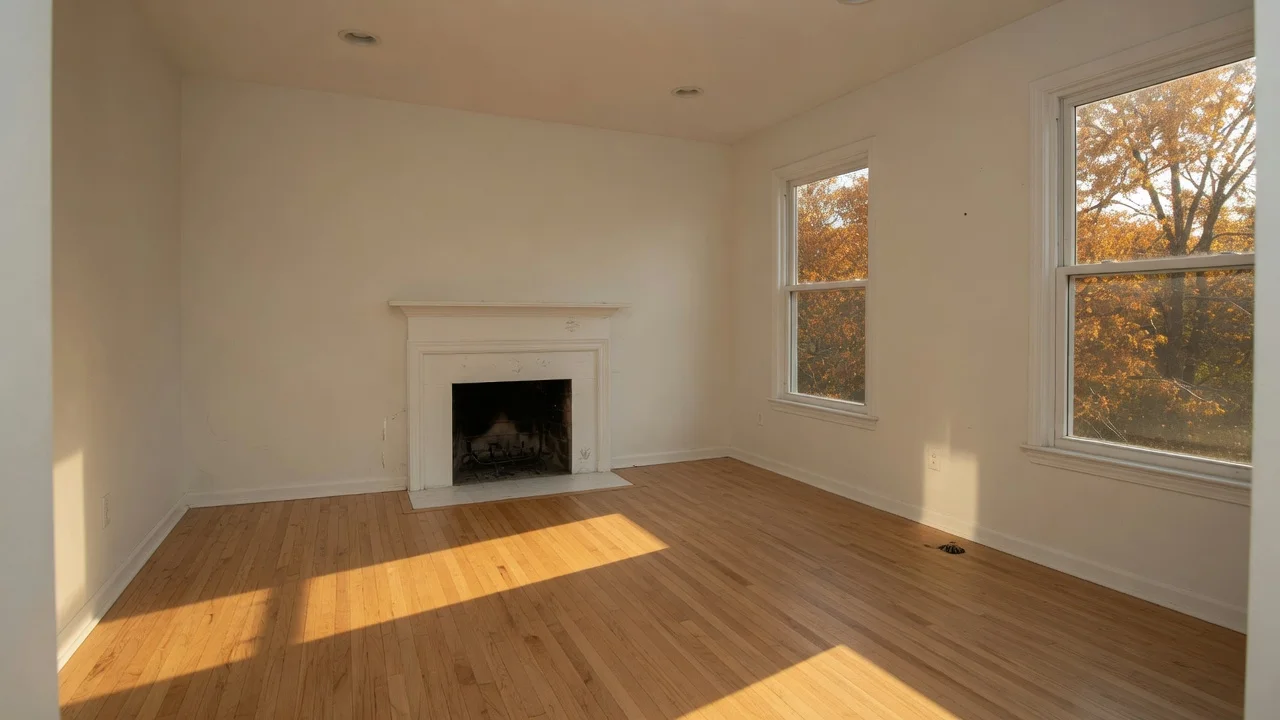 Original
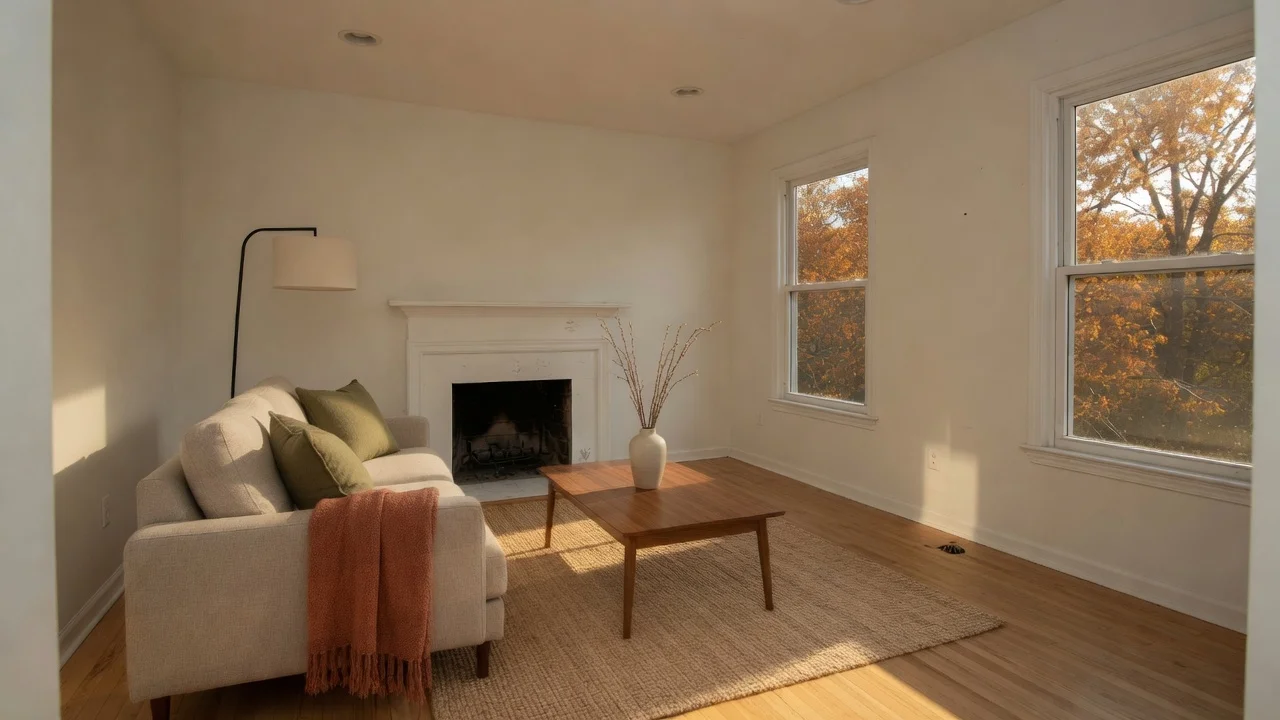 Staged sample
 Review note. Furniture and a rug were added. The fireplace, sooty firebox, windows, autumn view, hardwood, and floor vent should still match the original.
Turn a vacant listing photo into a staging proof, keep the original beside it, and review structure before you publish. The samples below show an autumn-light direction; the tool uses the existing style set.
Each pair starts with a vacant room and adds furniture and decor only. The staged image is a generated sample for listing-proof review, not a photograph of a live listing.
Generated sample. Keep the original photo. Do not treat added furniture as included, and reject any result that changes walls, floors, windows, fixtures, or visible defects.
Living room
Original Staged sample Review note. Furniture and a rug were added. The fireplace, sooty firebox, windows, autumn view, hardwood, and floor vent should still match the original.
Bedroom

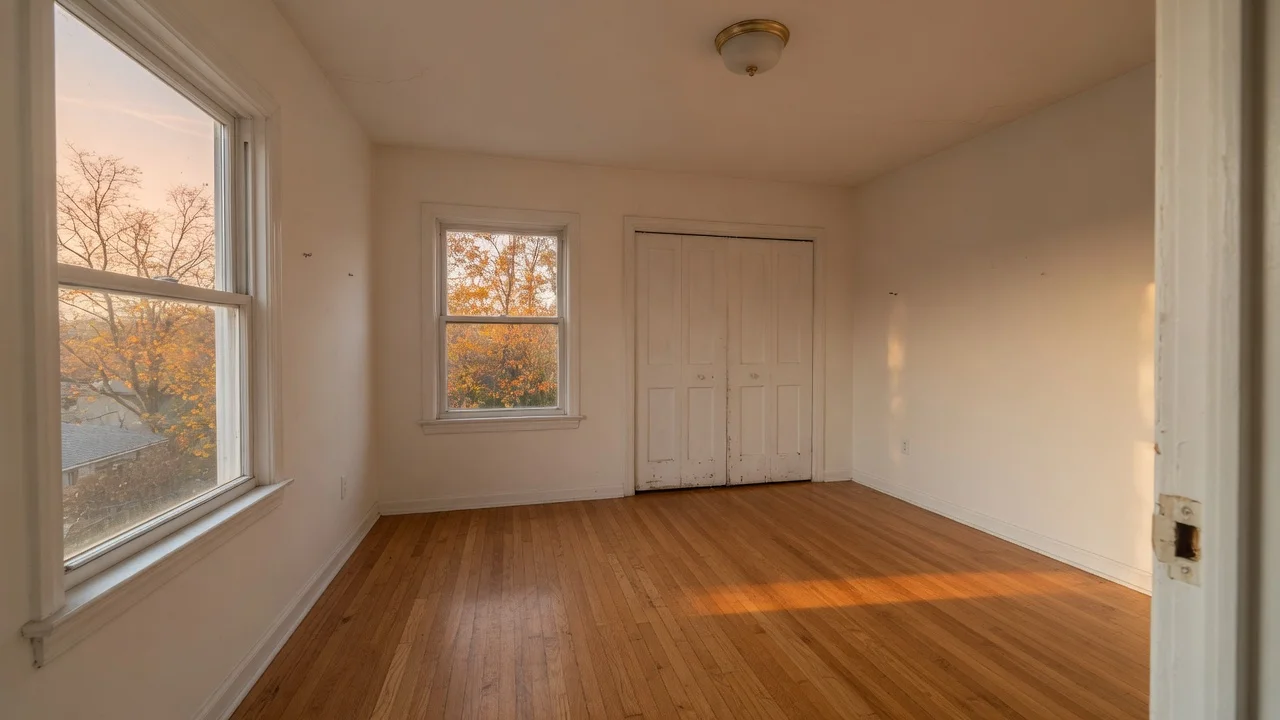 Original
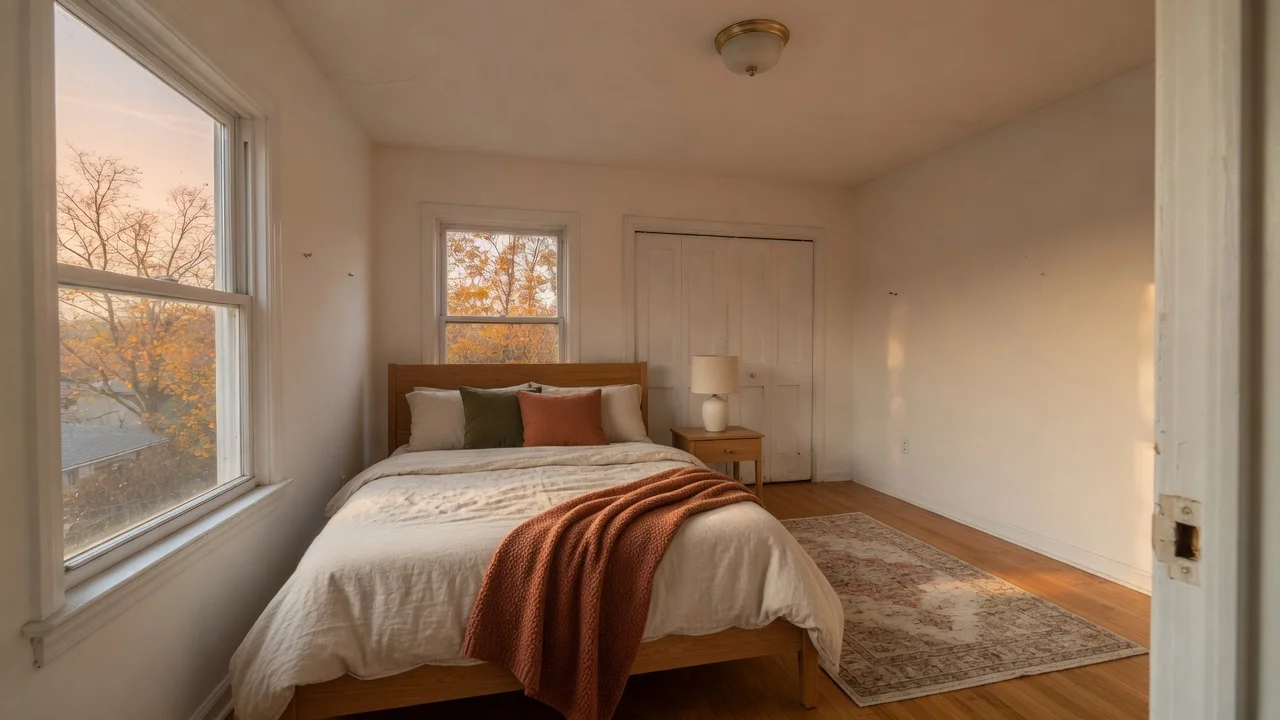 Staged sample
 Review note. A bed, nightstand, and small rug were added. Closet doors, ceiling fixture, window frames, and the autumn view should still match the original.
Upload a vacant listing photo on this page, choose one of the existing styles, and compare the proof with the original before export. 5 free credits included, no credit card required.
Add listing photos for a staging proof
Choose photos first. New accounts get 5 free credits. No card required.
Click, press Enter, or drop files here to open the photo picker
Keep the original photo, add furniture and decor only, and leave structure and defects unchanged. California listings add a statutory disclosure step — the AB 723 workflow below covers the two-part disclosure duty and which edits trigger it. Local MLS rules still vary by board. This page is not legal advice and does not certify MLS, brokerage, or statutory compliance.
Vacant rooms are hard to read from a thumbnail. A proof gives sellers, agents, and photographers one image to discuss before any file is used publicly. The useful step is the review: furniture scale, traffic flow, and whether the room still matches the original photo.
VirtualStagingAI keeps that loop on one page: upload listing photos, choose a restrained staging direction, generate proofs, then export only the results that pass review. For a credit breakdown, see the pricing page.
Estimate by listing set instead of by a fixed promise. Six Standard exports use 18 credits; six HD exports use 30 credits. Add proofing and retry credits when you are testing style direction. Teams that stage often may prefer monthly credits; occasional agents can use a one-time credit pack.
Assembly Bill 723 added Business and Professions Code § 10140.8 (Stats. 2025, Ch. 497). Since January 1, 2026, a real estate broker or salesperson — or anyone acting on their behalf — who uses a digitally altered image in an advertisement or other promotional material for the sale of real property owes two duties, not one.
A label alone is not enough under the statute: the conspicuous statement and the original-image access travel together.
The statute defines a digitally altered image as one created by or at your direction and changed through photo editing software or artificial intelligence to add, remove, or change elements — and it names fixtures, furniture, appliances, flooring, walls, paint color, hardscape, landscape, facade, floor plans, and elements visible from the property such as streetlights, utility poles, window views, and neighboring properties. AI virtual staging of a vacant room sits squarely inside that definition.
Excluded: images where only lighting, sharpening, white balance, color correction, angle, straightening, cropping, exposure, or similar common adjustments are made that do not change how the property is represented. Ordinary photo finishing is not staging; adding furniture is.
Section 10140.8 is a state statutory floor, not the whole rulebook. Your local MLS board, brokerage policy, and each syndication portal can add their own notation requirements on top — the strictest layer that applies to a photo is the one to meet, and MLS rules differ board to board. For Realtor members, NAR's 2026 Code of Ethics Article 12 (effective January 1, 2026) separately requires presenting a true picture in advertising, and Standard of Practice 12-10 confirms that duty covers internet content and images. The per-platform label and remarks language is in our virtual staging disclosure guide. Nothing on this page is legal advice, and this product does not certify MLS, brokerage, or statutory compliance.
The fall samples above are original-to-staged review examples: the vacant original stays intact, the staged version adds furniture and decor only, and the two sit side by side so the difference is easy to check. They cover the access half of the statute — when you publish a staged image, the statement half still has to travel with it. Apply the full pattern to a live listing:
Sources: Cal. Bus. & Prof. Code § 10140.8 (added by Stats. 2025, Ch. 497, AB 723; effective January 1, 2026; accessed September 13, 2026) · NAR Code of Ethics, 2026 (Article 12 and Standard of Practice 12-10; accessed September 13, 2026).
VirtualStagingAI uses credits. Preview proofs use 1 credit per photo, Standard exports use 3 credits, and HD exports use 5 credits. For a typical 6-photo listing, plan around 18 credits for Standard exports plus extra credits for proofing or retries.
Rules vary by MLS, brokerage, state, and publishing platform. In California, Business and Professions Code § 10140.8 (added by AB 723, effective January 1, 2026) requires a reasonably conspicuous statement on or next to the image saying it has been digitally altered and naming the link, URL, or QR code where the original unaltered image can be accessed. Keep original photos available, do not change structure or hide defects, and review the rules that apply to your listing before publishing. This product does not certify compliance.
Yes. Section 10140.8 defines a digitally altered image as one changed through photo editing software or artificial intelligence to add, remove, or change elements, and it names furniture, fixtures, appliances, flooring, walls, paint color, landscaping, facade, floor plans, and window views as examples. Adding furniture to a vacant-room photo fits that definition. Common adjustments like lighting, white balance, straightening, cropping, or exposure do not, as long as they do not change how the property is represented.
No. They are generated samples: a vacant room photo paired with a digitally furnished autumn-light proof. Use them to practice original-to-staged review, then apply the same check to your own photos.
Good input photos can produce useful listing proofs. Agents should still compare the result against the original for windows, doors, flooring, built-ins, visible defects, and furniture scale before using the output.
Start with the rooms that appear earliest in the listing set and are hardest to understand empty. For many homes that means the living room, primary bedroom, and kitchen, but the right order depends on the property and source photos.
Yes. Use multiple styles as proof options, then choose the result that fits the source photo, property type, and disclosure needs. Keep the final listing set clear so buyers are not confused by several staged versions of the same room.
Shoot from a corner or doorway to capture maximum floor space. Use landscape orientation and ensure good natural lighting. Remove any remaining personal items or debris. The AI works best with clear, well-lit photos taken at eye height on a tripod or steady surface.
Our Pro plan includes 500 credits per month. For brokerages and teams with higher volume, estimate the expected Proof, Standard, HD, and retry credits first, then contact us about larger account needs.
Per-platform disclosure language, MLS notation rules, and a pre-publish checklist.
Learn more →Review original and staged pairs before creating your own listing proof.
Learn more →Create living room proofs and review furniture scale before export.
Learn more →Create bedroom proofs and check bed scale, closet doors, and window access.
Learn more →Compare proof workflow, credits, exports, and review needs across staging options.
Learn more →Estimate credits by listing set, proofing, retries, and export quality.
Learn more →Keep the original photo beside every AI-staged version. Confirm that the room still matches the property, then label generated furniture or decor when your brokerage, MLS, portal, or rental platform requires it.
Clear source photos matter. Use a level, well-lit view with visible floor, walls, doors, windows, and fixed features so the model has enough information to judge scale.
Empty or lightly furnished rooms where buyers need help understanding scale, layout, and possible furniture direction.
Bathrooms, mirrors, kitchens, luxury finishes, and rental listings need closer review because small inaccuracies can change buyer or guest expectations.
Dark, cluttered, distorted, damaged, or misleading photos where a generated result would make the property look materially different from reality.